Submitting
This guide covers the final steps to submit your IPRA request to the NMPRC system.
Review Your Request
Before submitting, review all the information you've entered:
- Submission type is selected (Individual or Company)
- All required fields are completed
- Contact information is accurate
- Request description is detailed and clear
- Document format is selected (Digital or Printed)
- Delivery method is selected (if Printed format)
Submit the Request
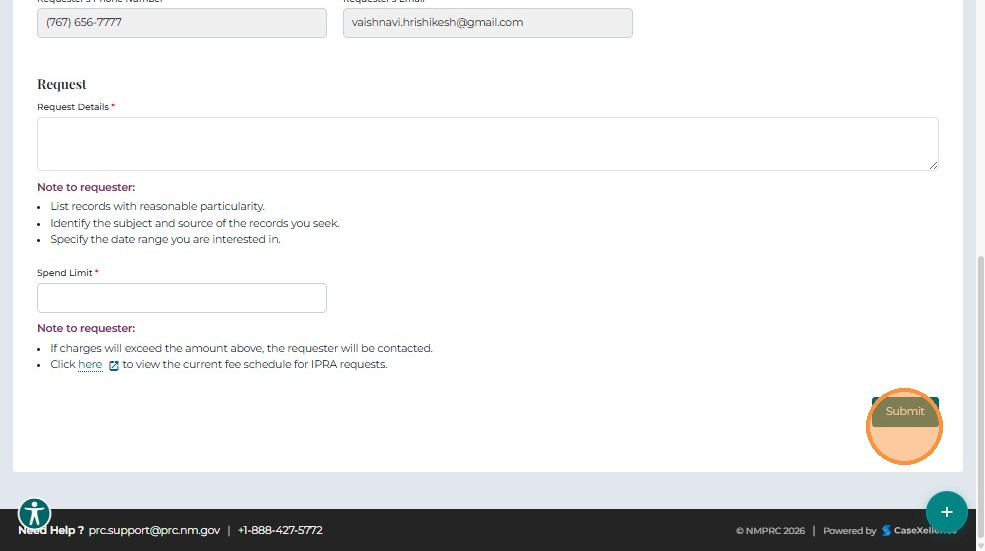
- Click Submit to send your IPRA Request.
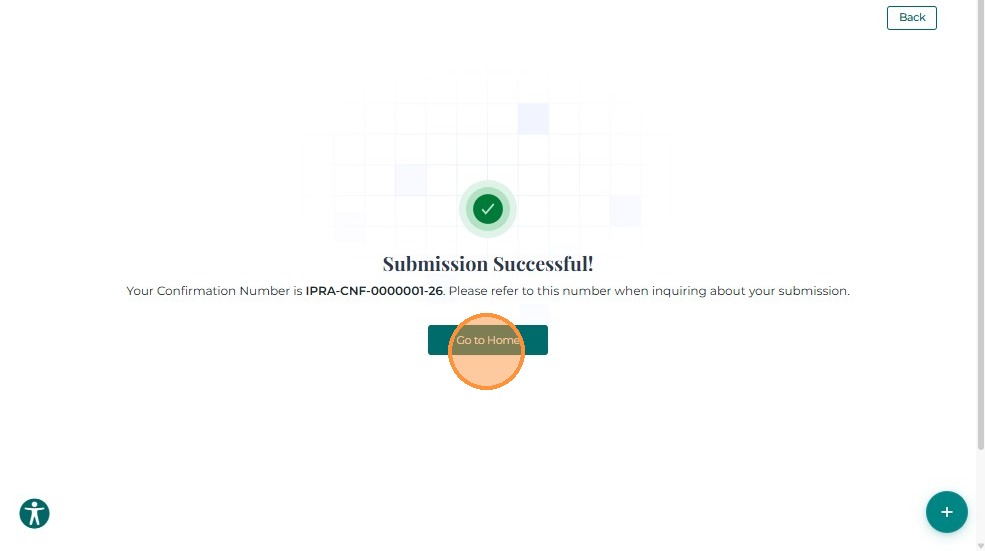
The system displays a Submission Successful message with your assigned Request ID.
Record this ID for reference or follow-up inquiries.
What Happens After Submission
Immediate Steps
- Confirmation: You'll receive a confirmation message with your Request ID
- Email Notification: A confirmation email is sent to your registered email address
- Dashboard Update: Your request appears in My IPRA Requests section
Important: Save your Request ID for future reference!
Review Process
Timeline: IPRA requires acknowledgment within 15 business days (as required by New Mexico law)
-
Initial Acknowledgment:
- Status: Acknowledged – Pending Review
- Your request is received and logged
- PRC staff begins processing
-
Review Period:
- Legal Counsel reviews your request
- Staff locates and prepares requested documents
- May take additional time depending on request complexity
Possible Status Updates
Your request may go through several statuses:
| Status | What It Means | What You Should Do |
|---|---|---|
| Acknowledged – Pending Review | Request received, under review | Wait for next update |
| Clarification Required | More information needed | Check email/dashboard for details and respond |
| Extension Request | Additional time needed to process | Wait for update (you'll be notified) |
| Payment Request | Payment required before processing | Follow payment instructions provided |
| Production Documents Available | Documents ready for download | Download from dashboard |
| Rejected – Closed | Request was denied | Review reason, may resubmit with corrections |
| Wrong Custodian – Closed | Request filed with wrong department | Contact Get Help for guidance |
| Broad and Burdensome | Request too broad, needs refinement | Narrow your request and resubmit |
| Closed | Request processing completed | Download any final documents |
If Clarification is Required
If your request shows "Clarification Required":
- Check your email for clarification request details
- Review the "Note to Requestor" section in your IPRA request dashboard
- Provide the requested information through the portal
- Respond promptly to avoid delays
Learn more: Managing Your Request
Receiving Your Documents
Digital Format:
- Documents available for download in your dashboard
- Status changes to "Production Documents Available"
- Download from My IPRA Requests → Click Request ID → Production Documents tab
Printed Format:
- Documents prepared for pickup or mailing
- You'll be notified when ready
- Follow delivery instructions provided
Timeline Expectations
- Acknowledgment: Within 15 business days (required by law)
- Simple requests: May be fulfilled within 15-30 business days
- Complex requests: May take longer, you'll be notified of any extensions
- Large requests: May require payment or additional processing time
Tracking Your Request
Ways to track:
- My IPRA Requests - View status and details in your dashboard
- Email Notifications - Receive automatic updates
- Request 360 View - Click Request ID to see full details
- Production Documents Tab - Download documents when available
Need Help?
- Status Questions: Check your dashboard or contact Get Help
- Clarification Issues: Review the Managing Guide
- Process Questions: Contact IPRA support via Get Help
- Troubleshooting: See Troubleshooting Guide
Next Steps
After submitting your request:
- Managing Your Request - View status, download documents, and respond to requests
Related Guides
- Submit IPRA Request - Overview - Introduction to IPRA requests
- Completing the Form - Fill out request details
- Dashboard - My Items - View your IPRA requests